emini Evolution: Create Personalized AI Images Using Your Google Photos
Google has reached a major milestone in personalizing artificial intelligence. In a move that bridges the gap between generative AI and personal memories, Gemini can now create personalized AI images by digging around in Google Photos. This update transforms the AI from a general artist into a personal creator that understands the specific people, pets, and places in your life.
For those who have been asking, “can gemini create images?“ the answer has evolved from a simple “yes” to a sophisticated “yes, and it can now feature you.”
The New Frontier: Personalized Image Generation
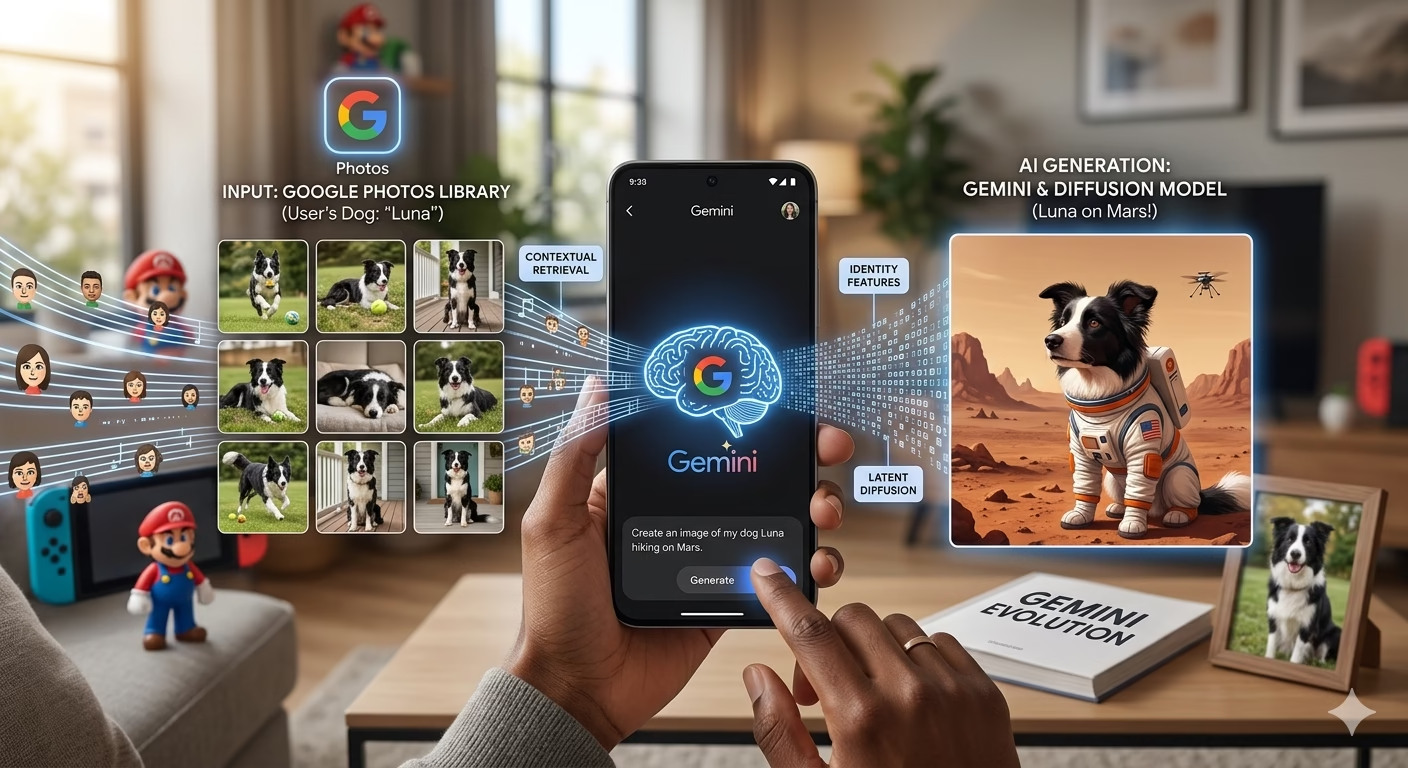
Traditionally, AI image generators create high-quality but generic visuals. If you asked for a “dog in a space suit,” you would get a random dog. With this new integration, you can now prompt Gemini to “generate an image of my dog in a space suit,” and the AI will reference your Google Photos library to ensure the breed, markings, and even the collar are accurate.
This shift marks a departure from “generic synthesis” to “personal reconstruction.” By accessing your historical data, Gemini understands the nuances that make your world unique. It isn’t just drawing a generic person; it’s understanding the facial structure, hair color, and style of the subjects you care about most. This level of personalized image generation turns the AI into a digital biographer, capable of visualizing your memories in entirely new contexts.
How it Works: “Digging Around” in Photos
By utilizing the Gemini to supercharge your ideas philosophy, the AI uses a “contextual retrieval” system. With user permission, it scans your library to identify consistent subjects—like your family members or your favorite vacation spots—and uses them as the blueprint for its generative output.
The technical magic happens through a combination of vector search and latent diffusion. When you ask for a personal image, Gemini doesn’t just “copy-paste” your face. Instead:
- It retrieves high-quality reference images from your Google Photos.
- It extracts the “identity features” (the unique characteristics of a person or pet).
- It integrates those features into the diffusion process to create a brand-new, original image that looks exactly like the subject.
Visual Concept: Imagine a split screen—on one side, a regular Google Photo of a golden retriever; on the other, a Gemini-generated masterpiece of that same retriever wearing a tuxedo and sitting in a Victorian-era library.
What Can Gemini Do With Uploaded Photos?
Beyond just creating new scenes, users are discovering a wide range of utilities that redefine creative workflows. If you are wondering what can Gemini do with uploaded photos, here are the primary features rolling out this week:
1. Style Transformation
Take a photo of your current living room and ask Gemini to “reimagine this room in a minimalist Scandinavian style.” The AI keeps the structural integrity of your home (the windows, the walls, the doorframes) but completely replaces the furniture, lighting, and decor.
2. Contextual Editing
Upload a photo of yourself and ask the AI to “place me in a 1920s jazz club.” The AI analyzes your pose and lighting, then creates a historically accurate environment around you, adjusting the shadows on your clothes to match the new scene.
3. Memory Mashups
Combine elements from multiple photos to create a brand-new digital keepsake. You can take a photo of your pet from 2019 and “place” them into a photo of your new backyard from 2026, creating a bridge across time through AI.
4. Advanced Creative Control
For users on the premium tier, the Gemini Advanced generate pictures feature offers even higher resolution and more complex prompt adherence. This includes better hand rendering, more accurate text within images, and “Multi-Subject” logic, allowing you to generate images featuring two specific friends from your photo library in the same scene.
Technical Guide: How to Get Started
If you are new to the platform and searching for gemini how to make images, the process is now more intuitive than ever. Follow these steps to unlock the power of personal AI:
Step 1: Grant Permission
Open the Gemini app or web interface and navigate to the “Extensions” menu. Ensure the “Google Photos” extension is toggled on. This gives the AI the “eyes” it needs to see your library.
Step 2: The Prompt
Use a natural, descriptive command. Avoid being overly technical; Gemini understands context.
- Example: “Show me and my wife as superheroes in a 1950s comic book style.”
- Example: “Put my cat, Luna, on a surfboard in Hawaii.”
Step 3: Refinement
The first result is rarely the final one. You can ask for changes in real-time. If the AI puts you in a red suit and you prefer blue, simply say: “Make the suit blue and add a cape.” This iterative process is what makes Gemini a true collaborator.
Privacy and Safety First: The “Invisible” Firewall
Given that this feature involves “digging around” in personal data, Google has implemented strict privacy guardrails to protect users.
- Private Vault: The AI does not “learn” from your photos for its public models. Your data remains encrypted and private to your account.
- Consent Guard: Gemini is programmed to refuse requests that involve generating images of people who aren’t in your photo library or generating non-consensual imagery.
- Deepfake Prevention: To prevent the misuse of can gemini create pictures technology, Google adds an invisible watermark (SynthID) to all generated images, identifying them as AI-created to prevent misinformation.
The Future of Digital Identity
As we move further into 2026, the line between “search” and “creation” continues to blur. Gemini is no longer just a tool to find a photo of your 2022 vacation; it is a tool to extend that vacation into a new reality. Whether you are using it for professional branding, personalized greeting cards, or just pure fun, the integration of Google Photos with Gemini represents the ultimate “supercharge” for your creative ideas.
Frequently Asked Questions (FAQs)
1. Can Gemini create images of anyone in my Google Photos?
Gemini is designed to recognize “frequent subjects” like you, your close family, or pets that you have tagged in your library. It requires clear reference photos to maintain accuracy. It generally will not generate images of strangers or people it cannot clearly identify.
2. Is this feature available on the free version of Gemini?
Basic personalized generation is available to all users. However, Gemini Advanced generate pictures offers faster processing, higher-quality output, and the ability to handle more complex “Multi-Subject” prompts for subscribers.
3. Does Gemini save the AI-generated images back to my Google Photos?
By default, the images stay within your Gemini chat history. However, you can manually save any generated masterpiece directly to your Google Photos library, download it to your device, or share it to social media.
4. Can Gemini create pictures from scratch without my photos?
Absolutely. If you don’t want to use personal data, you can still ask general prompts like “a futuristic city at night” or “a dragon made of glass,” and it will generate a completely original image using its base training data.
5. What are the requirements to use this feature?
To use the Google Photos integration, you need:
- A Google Account.
- The Google Photos extension enabled in Gemini settings.
- A stable internet connection.
- Mobile users generally need a device with at least 4GB of RAM for a smooth experience.
6. Can Gemini change the clothes I’m wearing in a photo?
Yes. One of the most popular uses of the “uploaded photo” feature is to ask Gemini to “change my outfit to a professional suit” or “make me look like a Viking.” The AI keeps your face consistent while altering your attire and surroundings.
7. Does this work with “Google Gemini Urdu” or other languages?
Yes, Google has expanded its natural language processing. You can give prompts in many regional languages, and the AI will understand the intent and access your photos accordingly.
🚀 Elevate Your Digital Presence with RojrzTech
The digital landscape evolves rapidly. Brands thrive when they adapt quickly, innovate continuously, and leverage robust online systems. RojrzTech empowers your business with tailored solutions in Website Development, UI/UX Design, Social Media Management, SEO, Branding, and Custom Digital Services.
Our expert team builds strategies that align perfectly with your goals, helping you achieve a stronger online presence, higher engagement, and sustainable growth. Every project is designed to give your brand a competitive edge in a fast-moving digital world.
📩 Ready to Transform Your Digital Future?
Don’t wait to take your brand to the next level. Contact RojrzTech today and start creating a digital experience that resonates, converts, and grows. Together, we’ll design, innovate, and elevate your brand’s online journey